Adding Columns
Adding Columns
There are several ways to add columns to your table. You can add them one by one, in batches, or using method chaining. You can also customize column properties like alignment and color.
Adding Columns One by One
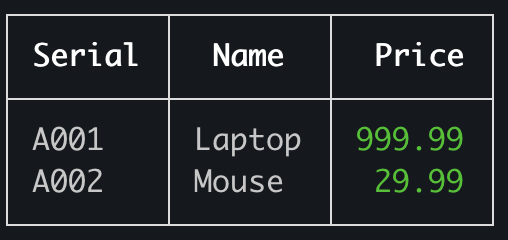
You can add columns individually using the addColumn method. This gives you fine-grained control over each column's properties.
import { Table } from 'console-table-printer';

// Initialize table with one column
const p = new Table({
  columns: [{ name: "Serial", alignment: "left" }],
});

// Add more columns one by one
p.addColumn({ name: "Name", alignment: "center" }); // Adding a single column
p.addColumn({ name: "Price", alignment: "right", color: "green" });

// Add some data
p.addRow({ Serial: "A001", Name: "Laptop", Price: 999.99 });
p.addRow({ Serial: "A002", Name: "Mouse", Price: 29.99 });
p.printTable();
Adding Multiple Columns at Once
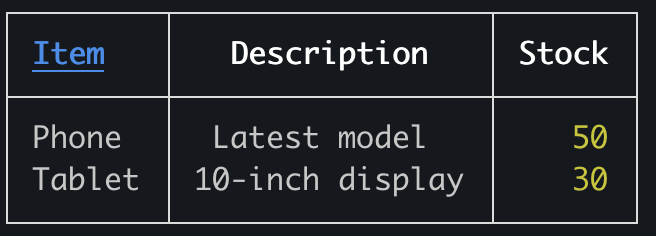
For efficiency, you can add multiple columns simultaneously using the addColumns method.
import { Table } from 'console-table-printer';

const p = new Table();

p.addColumns([
  // adding multiple columns
  { name: "Item", alignment: "left" },
  { name: "Description", alignment: "center" },
  { name: "Stock", alignment: "right", color: "yellow" }
]);

// Add some data
p.addRows([
  { Item: "Phone", Description: "Latest model", Stock: 50 },
  { Item: "Tablet", Description: "10-inch display", Stock: 30 }
]);
p.printTable();
Chained Column Adding
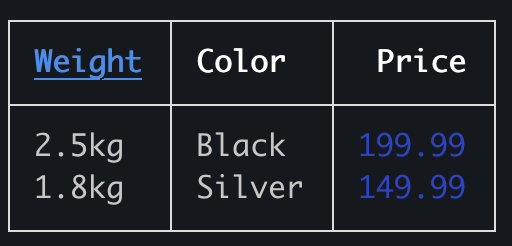
You can chain addColumn calls for a more fluent API experience.
import { Table } from 'console-table-printer';

const p = new Table();

p.addColumn({ name: "Weight", alignment: "left" })
  .addColumn({ name: "Color", alignment: "center" })
  .addColumn({ name: "Price", alignment: "right", color: "blue" });

// Add some data
p.addRow({ Weight: "2.5kg", Color: "Black", Price: 199.99 });
p.addRow({ Weight: "1.8kg", Color: "Silver", Price: 149.99 });
p.printTable();
Mixing Different Column Addition Methods
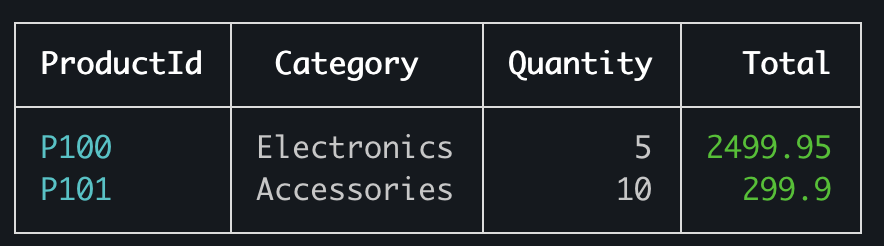
You can combine different column addition methods to build your table structure in the most convenient way.
import { Table } from 'console-table-printer';

const p = new Table();

// Add first column individually
p.addColumn({
  name: "ProductId",
  alignment: "left",
  color: "cyan"
});

// Add multiple columns at once
p.addColumns([
  { name: "Category", alignment: "center" },
  { name: "Quantity", alignment: "right" }
]);

// Add one more column
p.addColumn({
  name: "Total",
  alignment: "right",
  color: "green"
});

// Add some data
p.addRows([
  { ProductId: "P100", Category: "Electronics", Quantity: 5, Total: 2499.95 },
  { ProductId: "P101", Category: "Accessories", Quantity: 10, Total: 299.90 }
]);
p.printTable();
Column Properties
When adding columns, you can specify several properties:
name: The header text for the column (required)alignment: Text alignment within the column ("left", "center", or "right")color: Color of the column text (e.g., "green", "yellow", "blue", "cyan")
These properties help you create well-formatted, visually appealing tables that effectively present your data.